

Most ecommerce teams do not have a “marketing ideas” problem. They have an execution problem.
An AI marketing campaign only works when it moves through the same fundamentals as any strong campaign: clear goal, clean inputs, differentiated creative, disciplined testing, and a feedback loop that keeps improving. AI just compresses the time it takes to do that work.
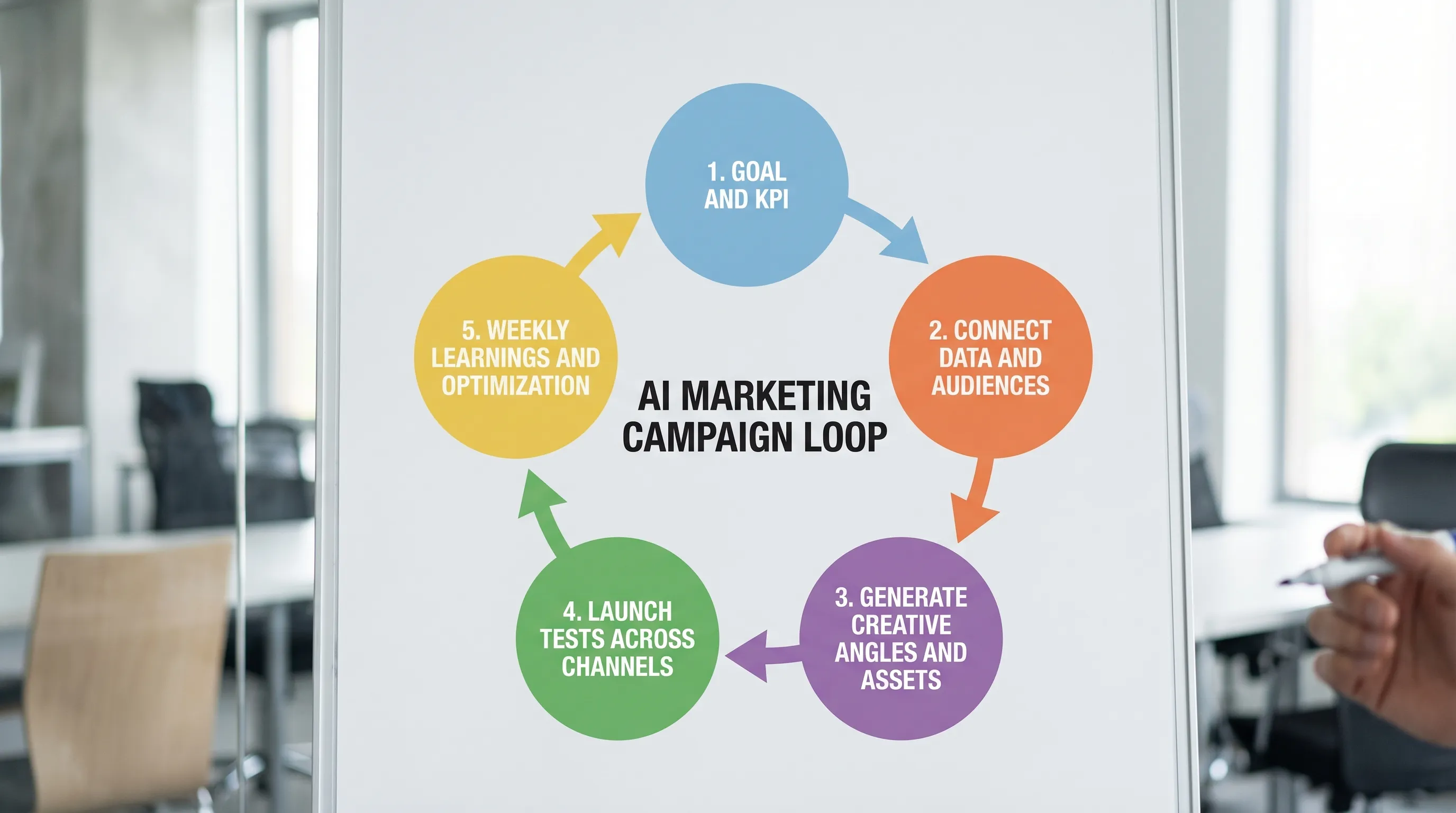
Below is a founder-friendly, channel-agnostic way to build an AI marketing campaign in 5 steps, without turning your brand into generic AI content.
What “AI marketing campaign” should mean (so you don’t waste money)
A useful definition: an AI marketing campaign is a campaign where AI accelerates planning, creative production, and optimization using your real business inputs, and a human still makes the key calls (offer, positioning, guardrails, approvals).
If AI is only writing captions or generating random ad images, you are not running an AI marketing campaign. You are just producing more stuff.
What you actually want is an operating system that:
- Pulls from your product, customer, and performance data
- Generates campaign angles and assets that fit your brand
- Publishes to your channels
- Tracks results and turns them into next-week actions
That is the difference between “more content” and “more growth.”
Step 1: Choose one campaign goal and one primary KPI
AI is great at generating options, but campaigns win by being narrow.
Start by picking one goal for the next 2 to 4 weeks. Common ecommerce goals:
- Acquire new customers profitably
- Increase repeat purchases (raise LTV)
- Launch a new product
- Move inventory (without training customers to wait for discounts)
Then choose one primary KPI that matches the goal. Examples:
- New customer acquisition: CPA (or first-order contribution margin), blended MER
- Retention push: repeat purchase rate, revenue per recipient (email), returning customer revenue share
- Product launch: new customer share of orders, product attach rate, add-to-cart rate
Two practical rules:
Do not pick a platform KPI as your only KPI. Platform ROAS can be useful, but it is not your business. Anchor on blended performance (like MER) and profit math.
Write down your constraint. This keeps AI output realistic.
Good constraints look like:
- “We must hit a $45 CPA on a $68 AOV product.”
- “We cannot discount more than 10%.”
- “We need 6 new creatives per week because fatigue is hitting fast.”
Once you have the goal, KPI, and constraints, you have the brief. Everything else is execution.
Step 2: Connect your data and define the audiences you will actually target
AI campaign building only gets “smart” when your inputs are real.
For DTC brands, the highest-leverage data sources usually include:
- Store and product data (often Shopify)
- Email and SMS engagement and purchase history (often Klaviyo)
- Paid media performance and event tracking (often Meta)
You do not need perfect data, but you do need consistent definitions.
Minimum tracking and data checks
Before you generate a single asset, confirm:
- Your purchase event is firing correctly
- Your product catalog is accurate (titles, variants, prices)
- You can separate new vs returning customers in reporting
If you skip this, AI will still generate creative, but you will not know what is working, and the “learning loop” breaks.
Define 3 to 5 audiences (not 25)
AI will happily create campaigns for dozens of micro-segments. That often increases complexity without increasing profit.
A simple starting set for many ecommerce brands:
- New prospects (broad)
- High-intent visitors (site engagers, product viewers)
- Cart or checkout abandoners
- Recent purchasers (for cross-sell and education)
- Lapsed customers (win-back)
This set is enough to cover acquisition and retention while keeping your campaign manageable.
Step 3: Use AI to generate an “angle bank,” then build assets from the winners
Most teams treat creative like a one-off deliverable. Winning brands treat creative like a system.
An AI marketing campaign should produce an angle bank, which is a list of testable messages that reflect why people buy.
Where your best angles come from
Before prompting AI, feed it reality:
- Top 10 customer objections (from reviews, support tickets, DMs)
- Top 10 reasons customers buy (from surveys, reviews, post-purchase feedback)
- Product differentiators that matter (not just features)
- Your top-performing ads and emails (what themes repeat?)
Then have AI generate angles in categories like:
- Problem to solution (pain, outcome, mechanism)
- Social proof (reviews, before/after, creator quotes)
- “I was skeptical but…” (objection handling)
- Comparison (versus old way, versus alternatives)
- Education (how it works, how to choose, how to use)
Turn angles into an asset kit
For each selected angle, generate a small set of assets that can run across channels:
- 3 hooks (first 2 seconds of a video, first line of an ad)
- 2 primary texts (short, long)
- 2 headlines
- 1 UGC-style script (15 to 30 seconds)
- 1 email module (subject line, opening, CTA)
This is where AI shines: speed and variation. Your job is to keep it on-brand and compliant.
A note on “AI-sounding” content and detection
Even when AI improves speed, you still need human editing for brand voice, accuracy, and legal claims.
If your team is worried about content that reads like boilerplate, or you want to learn about AI detection and rewriting workflows, resources like AI detection and humanization tools can be useful as part of your QA process. Use them as guardrails, not as a substitute for having a real point of view.

Step 4: Launch with a simple test plan across ads and email
A campaign is not “launched” when the creative is done. It is launched when you have controlled tests running and a plan to judge them.
Keep the test design simple
If you change audience, offer, creative angle, landing page, and budget at the same time, you cannot learn.
A practical starting approach:
- Test 3 angles at a time
- Keep the offer constant for the test window
- Keep the landing page constant unless you are explicitly running a CRO test
Paid social (example approach)
For Meta-style acquisition, many ecommerce brands can start with:
- One prospecting campaign with broad targeting (or a simplified structure)
- One retargeting campaign for high-intent visitors
Then run your 3 angles as separate creatives so you can see which message wins.
What to watch in the first 72 hours:
- CPM (are you reaching the right people?)
- CTR (is the creative earning attention?)
- CPC and early conversion signals (are clicks meaningful?)
What to watch after you have enough purchases:
- CPA against your target
- MER or blended efficiency trends
- Frequency (fatigue signals)
Email and SMS (example approach)
Email is the fastest place to validate messaging because you control the audience and costs are low.
In the same week you launch paid tests, run:
- One campaign email aligned to your best-performing angle
- One segmented send (VIPs or lapsed customers) aligned to a retention angle
Then reuse winning email language in ad copy, landing pages, and scripts. This is one of the simplest cross-channel compounding loops available to DTC teams.
Step 5: Turn results into weekly actions (the part most teams skip)
AI does not replace marketing leadership. It replaces busywork.
Your goal in week 2 and beyond is to run a repeatable weekly cadence:
- Review results (what actually moved the KPI?)
- Decide what to keep, kill, and iterate
- Ship the next batch of creative based on those learnings
What “actionable learnings” look like
Good learnings are specific and reusable:
- “Objection-handling angle beat aspirational lifestyle by 22% lower CPA.”
- “Founder POV videos are outperforming creator UGC for higher-priced items.”
- “Evergreen education emails are driving more revenue per recipient than discount blasts.”
Bad learnings are vague:
- “Video works.”
- “UGC is better.”
Make the learning so clear that next week’s creative brief can be written in 3 sentences.
Refresh the right thing
When performance drops, teams often touch the wrong lever.
Try this order:
- Refresh creative (new hooks, new opening scenes, new proof)
- Refresh the angle (new message)
- Refresh the offer (only if you must)
- Change targeting structure (last, not first)
This is especially important in 2026, where auction environments change quickly, and creative fatigue often hits before “audience fatigue.”
What to automate vs what must stay human
The healthiest AI marketing campaign workflows draw a clear line.
Automate:
- Angle ideation and variations
- First drafts of ad copy and emails
- Asset resizing, formatting, and versioning
- Publishing and workflow coordination
- Reporting and summarizing performance patterns
Keep human:
- Offer strategy and brand positioning
- Claims, compliance, and category nuances
- Final approvals (especially for paid ads)
- The “why” behind decisions (your creative strategy)
If you automate the judgment, you risk scaling the wrong thing faster.
Frequently Asked Questions
What is the fastest way to build an AI marketing campaign? Start with one goal, one KPI, and 3 audience buckets. Use AI to generate an angle bank, then launch 3 controlled creative tests and review results weekly.
Do I need a huge budget for an AI marketing campaign to work? No. You need enough budget to generate signal, but AI helps most by increasing creative velocity and shortening iteration cycles, even on modest spend.
How do I stop AI-generated ads from sounding generic? Feed AI your real inputs (reviews, objections, brand guidelines), limit it to a specific angle, then edit for voice, specificity, and proof. Treat AI output as a draft, not a final.
Should I use AI for email marketing too, or just ads? Use it for both. Email is often the fastest channel to validate messaging, and winning email language can be repurposed into ad copy and scripts.
How often should I optimize an AI marketing campaign? Weekly is the right default for most DTC teams. Daily changes usually create noise unless you are fixing obvious tracking or spend issues.
Build your next AI marketing campaign with Needle
If you want an AI marketing campaign that actually ships, the bottleneck is rarely “ideas.” It is turning ideas into on-brand assets, launching them across channels, and learning fast enough to compound.
Needle is built for that workflow: it generates marketing ideas, creates on-brand creative assets, publishes directly to platforms, automates campaign workflows, and tracks results to produce actionable learnings, with you in control of approvals.
Explore how it works at Needle and see how fast your team can go when execution becomes the default, not the struggle.