
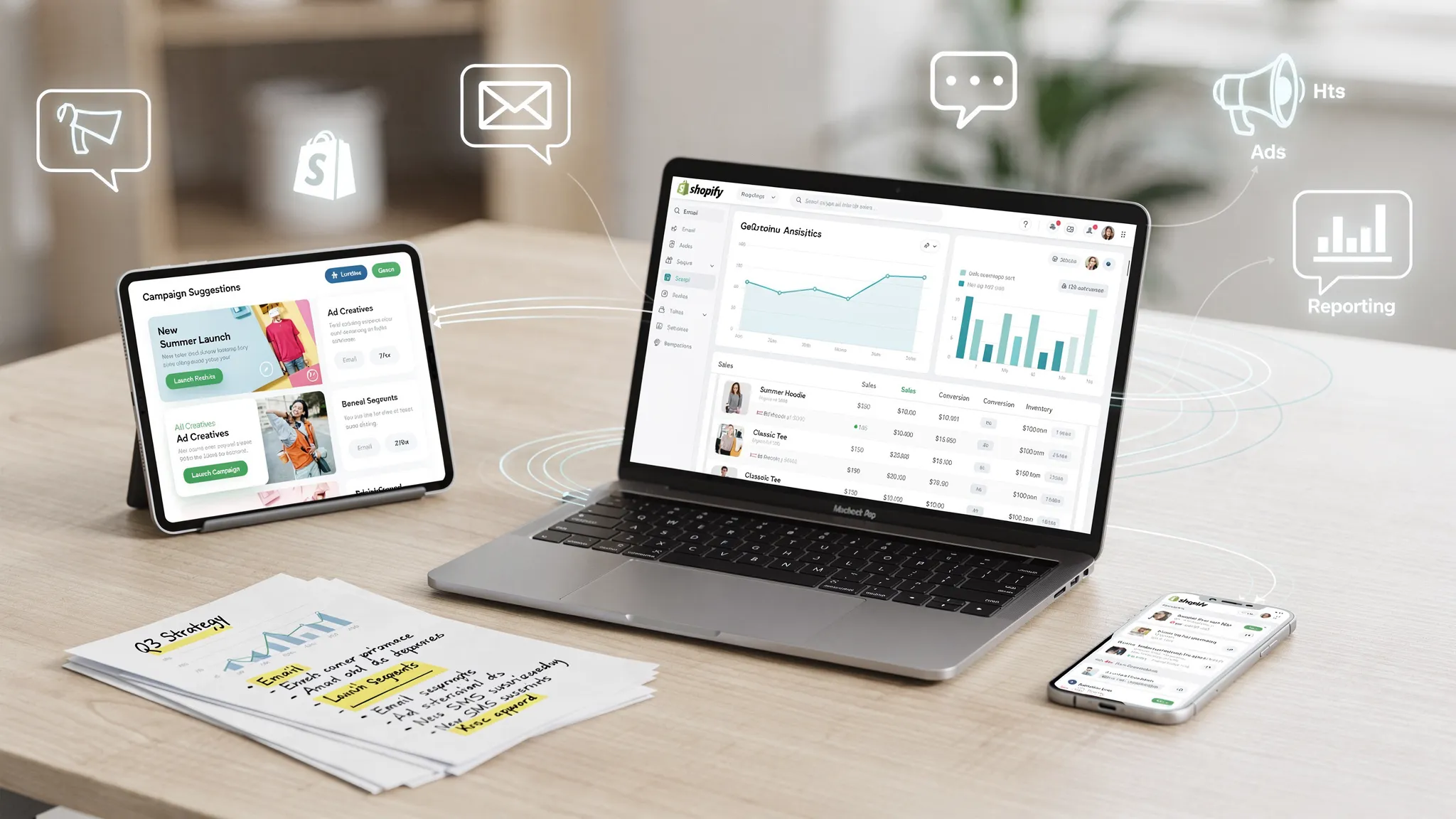
Connecting AI to Shopify is not just a technical setup task. It is the foundation for faster campaign planning, cleaner customer segmentation, better creative testing, and more consistent revenue reporting.
The mistake most ecommerce teams make is treating AI like a standalone content tool. They paste in a product description, ask for a few captions, and call it automation. That can help, but it misses the real advantage. When you connect AI to Shopify properly, the AI can learn from your products, customers, orders, margins, offers, and campaign results, then turn that context into better actions.
For a DTC brand, the goal is simple: build a controlled system where your store data feeds your marketing workflows, your team approves the work, and your campaigns keep improving every week.
What it means to connect AI to Shopify
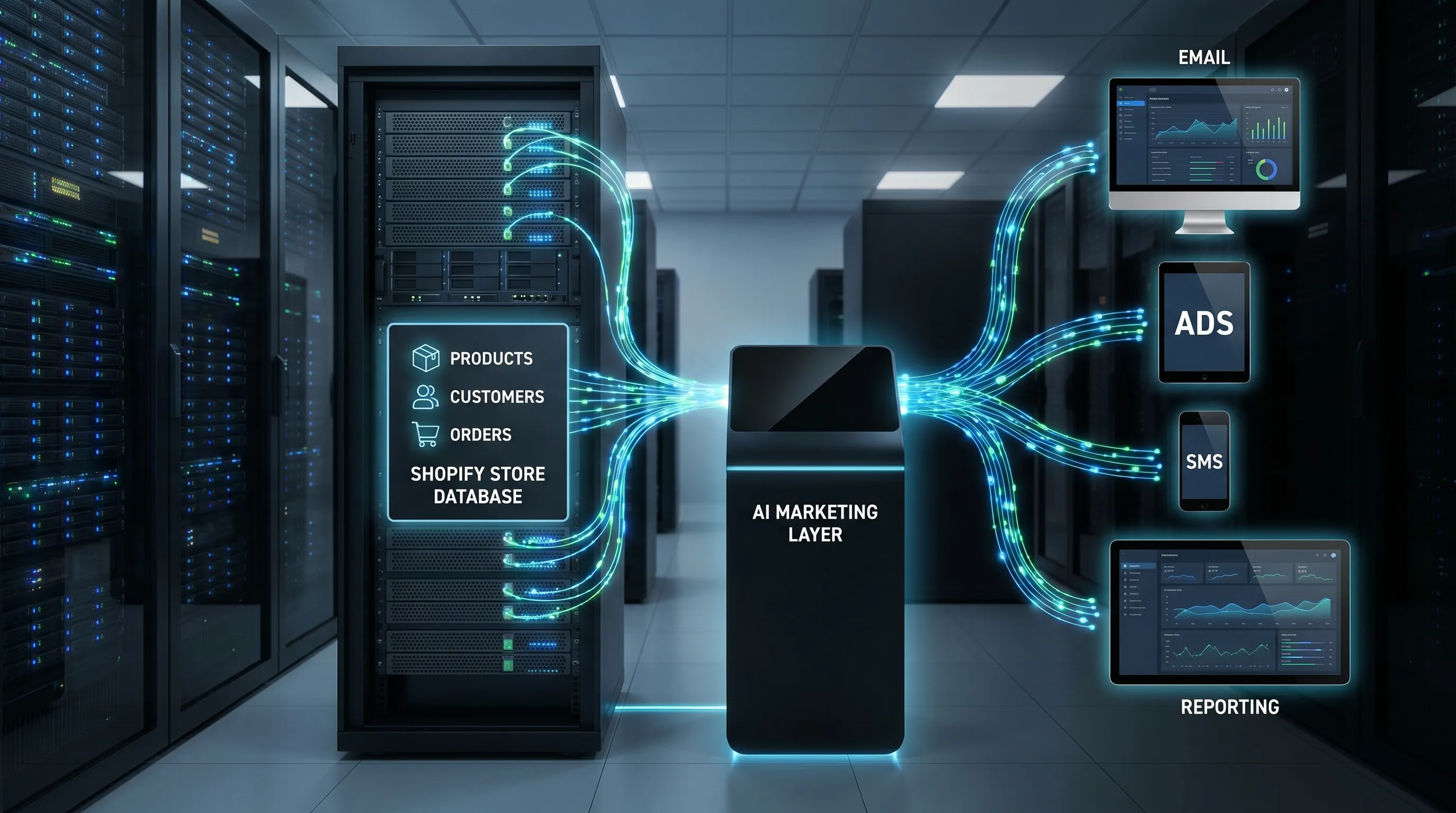
To connect AI to Shopify, you are linking your store data to an AI system that can analyze, generate, recommend, or execute marketing and operational tasks.
That connection usually has four parts:
- Data source: Shopify products, collections, orders, customers, inventory, discounts, tags, and customer events.
- AI layer: An AI app, marketing platform, custom agent, automation workflow, or model connected through an API.
- Action layer: Email, SMS, ads, product pages, reporting, customer support, direct mail, or internal tasks.
- Approval and governance: Permissions, brand rules, compliance checks, and human review before anything important goes live.
For marketing teams, this setup is most valuable when it connects Shopify with the channels that actually drive revenue. For example, AI can identify which products are gaining traction, generate campaign angles, create ad and email variants, publish approved assets, and track what worked.
If you want the strategic background before the setup steps, Needle’s guide to AI driven marketing automation explains how connected data changes the way ecommerce teams plan and optimize campaigns.
Before you start: pick one AI use case
Do not connect AI to Shopify just because the tool sounds impressive. Start with one clear business use case, then expand once the workflow is reliable.
Good first use cases include:
- Weekly campaign planning: Use Shopify sales and product data to generate campaign ideas for email, ads, and social.
- Product content: Create or improve product descriptions, collection copy, FAQs, and SEO snippets.
- Customer segmentation: Identify VIPs, first-time buyers, churn risks, abandoned cart shoppers, and high-AOV customers.
- Lifecycle marketing: Draft welcome emails, post-purchase flows, win-back campaigns, and replenishment reminders.
- Ad creative generation: Turn bestsellers, customer objections, and offer data into Meta or TikTok ad concepts.
- Reporting and learnings: Summarize Shopify, ad, and email performance into weekly action items.
For most growing DTC brands, campaign planning, email automation, and reporting are the highest-leverage starting points. They use existing data, have clear revenue metrics, and do not require the AI to make risky changes to your storefront.
Step 1: clean your Shopify data first
AI output is only as good as the data you give it. If your products are poorly tagged, your collections are messy, or your customer records are full of duplicates, the AI will generate generic or inaccurate recommendations.
Before connecting any AI tool, audit these Shopify inputs:
- Product titles, descriptions, images, SKUs, variants, and prices are accurate.
- Collections are organized around how customers shop, not just how your team thinks internally.
- Product tags are consistent across category, margin, seasonality, gender, size, use case, or ingredient.
- Customer records include useful tags such as VIP, wholesale, subscription, first-time buyer, or loyalty member.
- Discount codes are named clearly so campaigns can be analyzed later.
- UTM parameters are used consistently on paid, email, influencer, and campaign traffic.
- Returns, cancellations, and refunds are reflected in your reporting logic.
This step is not glamorous, but it determines whether your AI creates useful marketing or polished nonsense. A clean Shopify store lets the AI understand what you sell, who buys it, and what patterns matter.
If your data is messy, start small. Clean your top 20 percent of revenue-driving products, your main customer segments, and your active campaigns first. You do not need a perfect database to begin, but you do need enough structure for the AI to reason correctly.
Step 2: choose the right connection method
There are several ways to connect AI to Shopify. The right choice depends on your technical resources, security needs, and how much execution you want the AI to handle.
Option 1: use a Shopify app or AI marketing platform
This is the fastest route for most ecommerce teams. You install or authorize a platform, approve the requested permissions, and let it sync with your Shopify data.
This method is best when you want speed, built-in workflows, and less engineering overhead. A platform like Needle is designed for ecommerce marketing teams that want AI to generate tailored ideas, create on-brand creative assets, publish to connected platforms, track results, and turn learnings into future campaign improvements.
The key advantage is that you are not just connecting data. You are connecting data to execution.
Option 2: use an automation connector
Tools like Zapier, Make, or n8n can connect Shopify events to AI prompts and other apps. For example, a new order could trigger an AI-generated internal summary, or a product update could generate draft copy for review.
This is useful for lightweight workflows, but it can become fragile if you build too many disconnected automations. It is better for internal tasks than for full campaign management.
Option 3: build a custom Shopify app
Technical teams can create a custom app and connect Shopify to an AI model through the Shopify Admin API. Shopify’s Admin API documentation covers how apps access store resources such as products, orders, customers, and inventory.
This route gives you more control, but it also requires engineering work, security review, maintenance, and careful permission handling. It is best for brands with in-house developers or very specific workflows that off-the-shelf tools cannot support.
Option 4: connect Shopify to a warehouse or CDP first
Larger brands may pipe Shopify data into a data warehouse, customer data platform, or analytics layer before connecting AI. This is useful when Shopify is only one part of a larger data ecosystem that includes retail, subscriptions, loyalty, support, and multiple ad platforms.
For most founder-led ecommerce teams, this is more complex than necessary at the beginning.
Step 3: set permissions using least privilege
Once you choose a connection method, the next step is authorization. This is where many brands move too quickly.
AI tools should only access the data they need to do the job. If a tool only writes product descriptions, it may not need full order history. If a tool creates customer segments, it may need customer and order data, but not permission to edit your theme.
Common Shopify permission areas include:
- Products and collections for catalog analysis, descriptions, and merchandising.
- Orders for customer behavior, revenue analysis, repeat purchase patterns, and cohort reporting.
- Customers for segmentation, personalization, and lifecycle marketing.
- Discounts for campaign creation and offer testing.
- Store content for blogs, pages, or product copy workflows.
- Analytics or events for performance measurement.
If you use a Shopify app, review the permissions during installation before approving. If you build a custom app, create only the scopes needed for the workflow. For example, read_products is safer than broad write access if the AI only needs to analyze your catalog.
Also, keep human approval in the loop for anything that affects customer experience, pricing, legal claims, discounting, budgets, or published campaigns.
Step 4: connect the AI tool to Shopify
The exact setup varies by tool, but the general process is similar.
For an app or AI marketing platform, you will typically:
- Sign in with the Shopify store owner or an authorized admin account.
- Open the app or platform onboarding flow.
- Select Shopify as a data source.
- Review requested permissions.
- Approve the connection.
- Allow the first data sync to complete.
- Confirm which products, customers, orders, and events synced correctly.
For a custom app, the store owner or developer usually goes to Shopify Admin, opens Apps and sales channels, enables custom app development if needed, creates the app, selects Admin API scopes, installs the app, and securely stores the access token.
Do not paste API tokens into random documents, chat tools, or unsecured spreadsheets. Treat tokens like passwords. If a team member or contractor no longer needs access, revoke it.
After the connection is live, run a quick validation check. Pick a few known orders, customers, and products in Shopify, then confirm the AI system sees the same information. This catches field-mapping problems early.
Step 5: feed the AI your brand and business rules
Shopify data tells the AI what happened. Brand and business rules tell it what is allowed.
This is the step that separates useful AI marketing from generic AI output. Your AI tool should know your positioning, target customer, tone of voice, offer strategy, claims policy, product restrictions, and channel rules.
Give the AI inputs such as:
- Brand guidelines, voice rules, and examples of approved copy.
- Customer personas and common objections.
- Bestselling products and hero SKUs.
- Margin-sensitive products that should not be discounted heavily.
- Claims the brand can and cannot make.
- Competitor comparisons that are approved or off-limits.
- Channel rules for Meta, email, SMS, landing pages, and product copy.
- Approval requirements before anything is published.
For example, a skincare brand should define which ingredient claims are allowed, which before-and-after language is prohibited, and whether the brand can mention sensitive skin, acne, pregnancy, or medical outcomes. A fashion brand might define fit language, sizing caveats, sustainability claims, and return-policy messaging.
AI can move fast, but it should not invent claims, discounts, or guarantees. Your guardrails keep speed from turning into risk.
Step 6: connect Shopify data to marketing destinations
Shopify is the source of truth for your products and transactions, but most marketing execution happens elsewhere. To get real value, connect AI insights to the channels where customers actually see your campaigns.
Common destinations include:
- Email and SMS platforms for lifecycle flows and campaign sends.
- Meta, TikTok, Google, or Pinterest for paid acquisition and retargeting.
- Product feeds and catalogs for dynamic ads.
- Landing page builders for campaign-specific pages.
- Analytics tools for cross-channel reporting.
- Customer support platforms for order-aware responses.
Some brands also extend Shopify segments into offline channels. For example, an all-in-one direct mail platform can help turn customer data into targeted postcard or win-back campaigns alongside email, SMS, and paid retargeting.
The bigger point is that AI should not live in a content box. It should connect Shopify data to the channels that influence acquisition, conversion, retention, and repeat purchase.
If email and SMS are your first priority, Needle’s guide to Shopify marketing automation walks through the core flows that make this system revenue-generating.
Step 7: build your first AI workflow
Once the connection is working, do not try to automate every marketing task at once. Build one workflow, measure it, then expand.
A strong first workflow is the weekly campaign workflow. It turns Shopify performance data into a simple campaign plan your team can approve.
A practical weekly AI workflow looks like this:
- Pull last week’s Shopify sales, top products, low performers, AOV, conversion rate, and repeat purchase data.
- Ask the AI to identify patterns, opportunities, and customer segments worth targeting.
- Generate three to five campaign angles based on real product and customer behavior.
- Create first-draft assets for email, Meta ads, SMS, and organic social.
- Review claims, offers, design, and brand fit.
- Publish approved campaigns through the right platforms.
- Track performance and feed learnings into the next week’s plan.
This is the type of loop Needle is built around: connect to your tools, generate campaign ideas and assets, let you approve, then execute and learn continuously.
The main advantage is consistency. Instead of waiting for a monthly agency meeting or scrambling to create campaigns on the fly, your team gets a repeatable operating rhythm.
Step 8: test everything before publishing
Before letting AI-created campaigns or automations go live, test the workflow end to end.
Check these areas carefully:
- The AI is pulling the correct product, customer, and order data.
- Customer segments match Shopify and your email platform.
- Discount codes work and have the right rules.
- Draft copy does not include unsupported claims.
- Email links, product links, and UTMs are correct.
- Suppression rules are respected for unsubscribed or ineligible customers.
- Test orders trigger the correct events.
- Reports attribute revenue consistently.
For paid ads, start with small budgets and controlled tests. For email, send internal previews and seed-list tests before launching to customers. For product copy, review live pages on mobile before publishing changes.
The safest pattern is AI drafts, human approval, automated execution. Over time, you can automate more steps, but only after you trust the data, rules, and reporting.
Step 9: measure the right metrics
Connecting AI to Shopify should improve business outcomes, not just output volume. More emails, ads, or product descriptions do not matter if revenue and efficiency do not improve.
Track metrics that connect activity to growth:
- Revenue, orders, AOV, and conversion rate in Shopify.
- New vs. returning customer revenue.
- Customer acquisition cost and marketing efficiency ratio.
- Email revenue per recipient, click rate, and conversion rate.
- Paid ad CPA, ROAS, CTR, and creative fatigue.
- Campaign production time and approval time.
- Number of useful learnings generated per week.
The last two metrics are underrated. AI should make your team faster, but it should also make your team smarter. If every week produces clear learnings about products, audiences, offers, and creative angles, your marketing system gets stronger over time.
For a practical reporting cadence, use Needle’s weekly marketing report template to keep analysis focused on decisions rather than dashboard screenshots.
Common mistakes when connecting AI to Shopify
The setup is not difficult, but the operating model matters. These are the mistakes that usually cause AI projects to stall.
Giving AI too much access too soon
Avoid giving write access across your store before you understand how the tool behaves. Start with read-only analysis or draft generation, then expand permissions when the workflow is proven.
Skipping brand guardrails
If the AI does not know your tone, claims policy, offer rules, and customer objections, it will sound generic. Worse, it may create messaging your brand would never approve.
Automating bad workflows
AI makes workflows faster. It does not automatically make them better. If your campaign process is unclear, your segments are messy, or your reporting is inconsistent, AI will scale the confusion.
Measuring only content output
The goal is not to create 50 emails or 100 ad variants. The goal is to improve revenue, conversion, retention, CAC, MER, and learning velocity.
Treating AI as set-and-forget
The best AI marketing systems are reviewed weekly. You still need human judgment on positioning, offers, customer insight, and business priorities.
Frequently Asked Questions
Can I connect ChatGPT directly to Shopify? Not by default. You need a Shopify app, automation connector, custom app, or API-based workflow that securely passes Shopify data to an AI model. For most merchants, using a vetted app or AI marketing platform is simpler than building a direct integration.
Do I need a developer to connect AI to Shopify? Not always. If you use a Shopify app or AI marketing platform, setup can be handled through an authorization flow. You may need a developer for custom apps, advanced API workflows, data warehouse setups, or highly specific automation logic.
What Shopify data should AI access first? Start with products, orders, customers, collections, discounts, and performance data relevant to your use case. Use the least access required. If the AI is only drafting product descriptions, it probably does not need deep customer data.
Is it safe to let AI publish Shopify changes automatically? It can be safe only with strict permissions, approval workflows, and testing. For most brands, AI should draft and recommend while humans approve anything involving pricing, claims, product pages, emails, ad budgets, or customer-facing campaigns.
What is the best first AI workflow for Shopify brands? A weekly campaign workflow is usually the best starting point. It uses Shopify data to identify opportunities, generate campaign angles, create draft assets, launch approved campaigns, and review performance the following week.
How long does it take to see value after connecting AI to Shopify? Simple workflows can save time within days. Revenue impact usually depends on the quality of your data, campaign cadence, approval speed, and whether the AI is connected to execution channels like email, SMS, and paid ads.
Turn your Shopify store into an AI-powered growth system
Connecting AI to Shopify is the first step. The real growth comes when that connection becomes a repeatable loop: analyze store data, generate better ideas, create on-brand assets, publish approved campaigns, track results, and apply the learnings next week.
Needle helps ecommerce brands build that loop without adding agency bloat. It connects to your tools, generates tailored marketing ideas, creates on-brand creative assets, publishes directly to platforms, tracks results, and turns performance into actionable learnings.
If you want to move from manual marketing chaos to a connected AI-powered workflow, visit Needle and see how your Shopify data can become your next campaign engine.